Modern applications are expected to be scalable, testable, and easy to maintain. As projects grow, poor structure can quickly lead to tightly coupled code, difficult testing, and painful refactoring. This is where Clean Architecture shines.
In this tutorial, Clean Architecture in ASP.NET Core, you’ll learn how to design applications that clearly separate business rules from frameworks, databases, and UI concerns. Instead of letting ASP.NET Core or Entity Framework dictate your design, you’ll build a solution where business logic is at the center, and everything else depends on it.
What Is Clean Architecture?
Clean Architecture, popularized by Robert C. Martin (Uncle Bob), is based on a simple rule:
Source code dependencies must point inward.
This means:
-
Business rules don’t depend on UI, database, or external frameworks
-
Frameworks and tools are details, not the foundation
-
Core logic can be tested without ASP.NET Core, databases, or web servers
Typical layers include:
-
Domain – Entities and core business rules
-
Application – Use cases, interfaces, and application logic
-
Infrastructure – Databases, external services, file systems
-
Presentation (API/UI) – ASP.NET Core controllers, endpoints, and DTOs
Why Use Clean Architecture in ASP.NET Core?
ASP.NET Core is flexible and lightweight, which makes it an excellent fit for Clean Architecture. By combining the two, you gain:
-
High testability – Unit-test business logic without mocking the web framework
-
Low coupling – Replace databases or UI layers with minimal changes
-
Long-term maintainability – Easier refactoring as requirements evolve
-
Framework independence – ASP.NET Core becomes an implementation detail
What You’ll Build in This Tutorial
Throughout this tutorial, you will:
-
Design a Clean Architecture solution structure in ASP.NET Core
-
Implement Domain, Application, Infrastructure, and API layers
-
Apply Dependency Inversion using interfaces and dependency injection
-
Integrate Entity Framework Core without leaking it into your core logic
-
Build a RESTful API that follows Clean Architecture principles
-
Learn best practices for validation, error handling, and testing
Who This Tutorial Is For
This guide is ideal if you:
-
Already know basic ASP.NET Core
-
Want to write enterprise-grade APIs
-
Are tired of tightly coupled controllers and services
-
Want a clean foundation for real-world projects
Clean Architecture Principles and Dependency Rules
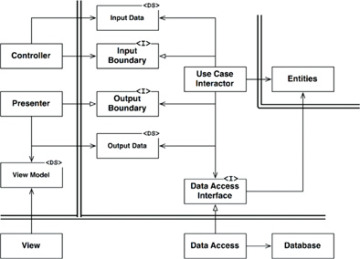
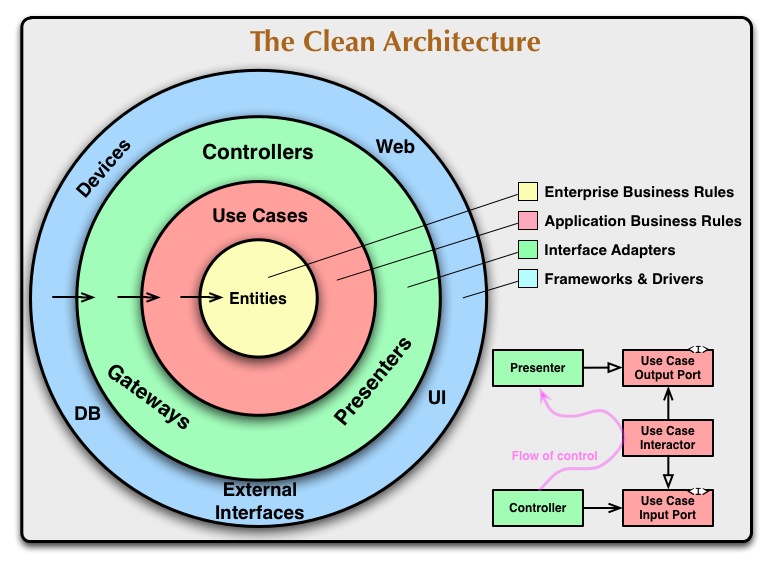
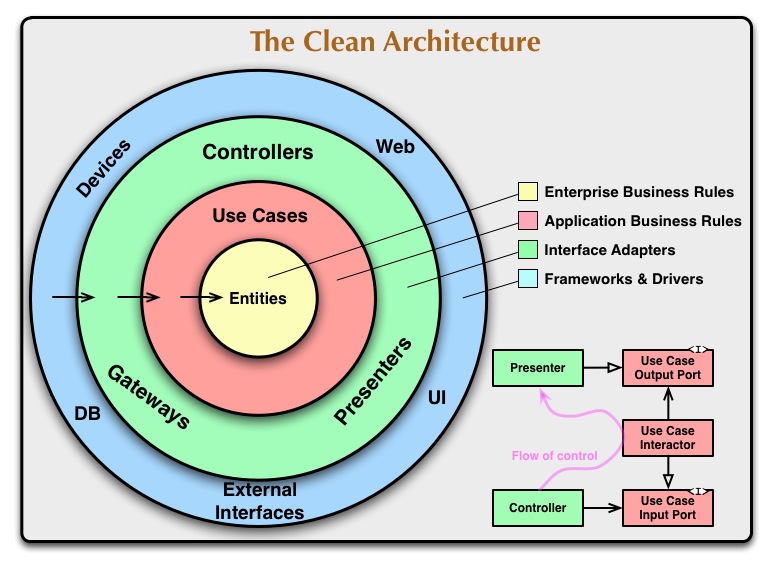
Before writing any code, it’s critical to understand the core principles behind Clean Architecture. These principles guide how you structure your ASP.NET Core solution and help you avoid tight coupling as your application grows.
1. The Dependency Rule
The most important rule in Clean Architecture is:
Dependencies must always point inward.
This rule was formalized by Robert C. Martin and means:
-
Inner layers know nothing about outer layers
-
Outer layers depend on inner layers
-
Business rules are isolated from technical details
In practice:
-
The Domain layer depends on nothing
-
The Application layer depends only on Domain
-
Infrastructure depends on Application and Domain
-
API/UI depends on everything else, but nothing depends on it
This keeps your business logic protected from changes in frameworks, databases, or delivery mechanisms.
2. Separation of Concerns (SoC)
Each layer in Clean Architecture has one clear responsibility:
-
Domain → What the business is
-
Application → What the business does
-
Infrastructure → How things are implemented
-
Presentation → How users interact with the system
In ASP.NET Core, this prevents common problems like:
-
Controllers containing business logic
-
Entity Framework code leaking into domain entities
-
Tight coupling between controllers and database models
3. Independence from Frameworks
Clean Architecture treats frameworks as tools, not foundations.
In ASP.NET Core:
-
ASP.NET Core is just a delivery mechanism
-
Entity Framework Core is just a data access tool
-
You should be able to replace EF Core without touching business rules
This is why:
-
DbContext lives in Infrastructure
-
Interfaces (repositories, services) live in Application
-
Controllers only coordinate requests and responses
4. Dependency Inversion Principle (DIP)
Instead of high-level modules depending on low-level details, both depend on abstractions.
In real terms:
-
Application defines interfaces
-
Infrastructure provides implementations
-
ASP.NET Core DI container wires them together
Example (conceptually):
-
Application defines
IUserRepository -
Infrastructure implements
UserRepository -
API injects
IUserRepository, not the concrete class
This makes your code:
-
Easier to test
-
Easier to replace
-
Easier to extend
5. Testability as a First-Class Goal
Because inner layers don’t depend on frameworks:
-
Domain logic can be unit-tested without ASP.NET Core
-
Application use cases can be tested with fake repositories
-
Infrastructure can be tested separately with integration tests
Clean Architecture encourages fast, isolated tests, which is essential for long-term maintenance.
How These Principles Map to ASP.NET Core
| Principle | ASP.NET Core Impact |
|---|---|
| Dependency Rule | Controllers depend on Application, never the reverse |
| SoC | Thin controllers, rich application services |
| Framework Independence | No EF Core in Domain or Application |
| DIP | Interfaces in Application, implementations in Infrastructure |
| Testability | Business logic tested without a web or a database |
Designing the Clean Architecture Solution Structure in ASP.NET Core
With the core principles in place, it’s time to translate them into a concrete ASP.NET Core solution structure. A well-defined structure is what keeps Clean Architecture enforceable as your project grows and new developers join the team.
High-Level Solution Overview
In ASP.NET Core, Clean Architecture is typically implemented using multiple projects in a single solution. Each project represents a layer and enforces dependency boundaries at compile time.
A common structure looks like this:
src/
 ├── MyApp.Domain
 ├── MyApp.Application
 ├── MyApp.Infrastructure
 └── MyApp.API
Each project has a clear responsibility and strict dependency rules.
1. Domain Layer (MyApp.Domain)
The Domain layer is the heart of your application.
Responsibilities:
-
Business entities
-
Value objects
-
Domain rules and invariants
-
Domain events (optional)
What belongs here:
-
Plain C# classes
-
No framework references
-
No EF Core attributes
-
No ASP.NET Core dependencies
Example contents:
Entities/
 └── Product.cs
ValueObjects/
 └── Money.cs
This layer should be stable and change the least over time.
2. Application Layer (MyApp.Application)
The Application layer defines what the system can do.
Responsibilities:
-
Use cases (application services)
-
Interfaces (repositories, external services)
-
DTOs and request/response models
-
Validation rules
What belongs here:
-
IProductRepository -
CreateProductCommand -
GetProductsQuery -
Application-level exceptions
Example structure:
Interfaces/
 └── IProductRepository.cs
UseCases/
 └── CreateProduct/
     ├── CreateProductCommand.cs
     └── CreateProductHandler.cs
This layer depends only on Domain.
3. Infrastructure Layer (MyApp.Infrastructure)
The Infrastructure layer contains technical implementations.
Responsibilities:
-
Database access (EF Core)
-
External services (email, file storage)
-
Third-party integrations
-
Repository implementations
What belongs here:
-
AppDbContext -
EF Core entity configurations
-
Repository implementations
-
Migration files
Example:
Persistence/
 ├── AppDbContext.cs
 └── Configurations/
Repositories/
 └── ProductRepository.cs
This layer depends on Application and Domain.
4. Presentation Layer (MyApp.API)
The API layer is the entry point of your application.
Responsibilities:
-
HTTP endpoints (controllers or minimal APIs)
-
Request/response mapping
-
Authentication and authorization
-
Dependency injection configuration
What belongs here:
-
Controllers
-
API DTOs
-
Filters and middleware
-
Program.cs
Example:
Controllers/
 └── ProductsController.cs
Controllers should be thin—they coordinate, not calculate.
Dependency Flow (Enforced by Projects)
API ──► Application ──► Domain
 │
└──► Infrastructure ──► Application ──► Domain-
Domain has no dependencies
-
Application depends only on the Domain
-
Infrastructure depends on Application + Domain
-
API depends on all layers but contains no business logic
Naming and Practical Tips
-
Use clear, explicit names (
Application, notServices) -
Avoid putting EF Core entities in the Domain
-
Keep controllers thin
-
Favor use-case folders over technical groupings
Creating the ASP.NET Core Solution and Projects
Now that the architecture and responsibilities are clear, let’s create the solution and projects using the .NET CLI and wire them together correctly. This step is crucial because project references enforce Clean Architecture boundaries at compile time.
Prerequisites
Before you start, make sure you have:
-
.NET SDK 8 or newer installed
-
Basic familiarity with the command line
-
An empty working directory
Check your SDK version:
dotnet --versionStep 1: Create the Solution
Create a new solution file:
dotnet new sln -n CleanArchitectureDemoThis solution will contain all four layers.
Step 2: Create the Projects
Create a src folder and generate each project.
mkdir src
cd src
Domain Project
dotnet new classlib -n CleanArchitectureDemo.DomainApplication Project
dotnet new classlib -n CleanArchitectureDemo.ApplicationInfrastructure Project
dotnet new classlib -n CleanArchitectureDemo.InfrastructureAPI Project
dotnet new webapi -n CleanArchitectureDemo.APIYour folder structure now looks like:
src/
 ├── CleanArchitectureDemo.Domain
 ├── CleanArchitectureDemo.Application
 ├── CleanArchitectureDemo.Infrastructure
 └── CleanArchitectureDemo.API
Step 3: Add Projects to the Solution
From the root folder (where the .sln file is located):
dotnet sln add src/**/CleanArchitectureDemo.*.csprojVerify everything is added:
dotnet sln listStep 4: Configure Project References (Critical)
This is where Clean Architecture is enforced.
Application → Domain
dotnet add src/CleanArchitectureDemo.Application reference src/CleanArchitectureDemo.DomainInfrastructure → Application + Domain
dotnet add src/CleanArchitectureDemo.Infrastructure reference src/CleanArchitectureDemo.Application
dotnet add src/CleanArchitectureDemo.Infrastructure reference src/CleanArchitectureDemo.Domain
API → Application + Infrastructure
dotnet add src/CleanArchitectureDemo.API reference src/CleanArchitectureDemo.Application
dotnet add src/CleanArchitectureDemo.API reference src/CleanArchitectureDemo.Infrastructure
⚠️ Important:
-
Domain references nothing
-
Application references Domain only
-
Infrastructure never references API
-
API never references the Domain directly for business logic
If you accidentally break these rules, the compiler will catch it.
Step 5: Clean Up Default Files
To keep things clean:
-
Delete
Class1.csfrom all class library projects -
Keep
Program.csin the API project -
Remove example controllers (like
WeatherForecastController) from the API project
Step 6: Verify the Build
Run this from the solution root:
dotnet buildIf everything is wired correctly, the solution should build without errors.
Why This Setup Matters
By using separate projects instead of folders:
-
Dependencies are enforced automatically
-
Accidental coupling is prevented
-
The architecture stays clean as the project grows
This structure scales well from small APIs to large enterprise systems.
Implementing the Domain Layer (Entities and Business Rules)
The Domain layer is the most important part of Clean Architecture. It represents the core business logic and must remain pure, stable, and independent of any framework or infrastructure concern.
In this section, we’ll define entities and business rules without referencing ASP.NET Core, Entity Framework, or any external libraries.
What the Domain Layer Should (and Should Not) Contain
✅ Should contain
-
Entities
-
Value Objects
-
Business rules and invariants
-
Domain-specific exceptions
-
Domain events (optional)
❌ Must NOT contain
-
EF Core attributes (
[Key],[Table], etc.) -
Database logic
-
DTOs
-
ASP.NET Core dependencies
-
Logging or configuration
Think of the Domain layer as plain C# + business rules only.
Step 1: Create a Simple Entity
Let’s start with a simple Product entity.
Location
CleanArchitectureDemo.Domain/Entities/Product.csnamespace CleanArchitectureDemo.Domain.Entities;
public class Product
{
public Guid Id { get; private set; }
public string Name { get; private set; }
public decimal Price { get; private set; }
private Product() { } // For ORM compatibility (not ORM-dependent)
public Product(string name, decimal price)
{
if (string.IsNullOrWhiteSpace(name))
throw new ArgumentException("Product name cannot be empty.");
if (price <= 0)
throw new ArgumentException("Price must be greater than zero.");
Id = Guid.NewGuid();
Name = name;
Price = price;
}
public void UpdatePrice(decimal newPrice)
{
if (newPrice <= 0)
throw new ArgumentException("Price must be greater than zero.");
Price = newPrice;
}
}Why This Is a Proper Domain Entity
-
Validation rules are inside the entity
-
State changes are controlled
-
No framework references
-
Business invariants are enforced at all times
Step 2: Introduce a Value Object (Optional but Recommended)
Value objects represent concepts with no identity, only value.
Example: Money
Location
CleanArchitectureDemo.Domain/ValueObjects/Money.csnamespace CleanArchitectureDemo.Domain.ValueObjects;
public sealed class Money
{
public decimal Amount { get; }
public Money(decimal amount)
{
if (amount <= 0)
throw new ArgumentException("Amount must be greater than zero.");
Amount = amount;
}
}You could later replace decimal Price in Product with Money for richer domain modeling.
Step 3: Domain Exceptions
Avoid throwing generic exceptions everywhere. Domain-specific exceptions make your intent clear.
namespace CleanArchitectureDemo.Domain.Exceptions;

public class InvalidProductException(string message) : Exception(message)
{
}
Use these exceptions to clearly signal business rule violations, not technical errors.
Step 4: Keep the Domain Stable
Best practices:
-
Domain code changes less frequently
-
Avoid adding technical concerns “just for convenience”
-
Favor expressive methods (
UpdatePrice) over property setters -
Protect invariants at all times
If you can unit-test your domain without mocks, you’re doing it right.
Step 4: Keep the Domain Stable
Best practices:
-
Domain code changes less frequently
-
Avoid adding technical concerns “just for convenience”
-
Favor expressive methods (
UpdatePrice) over property setters -
Protect invariants at all times
If you can unit-test your domain without mocks, you’re doing it right.
Key Takeaways
-
Domain is the center of Clean Architecture
-
Business rules live with the data they protect
-
No dependencies = high testability
-
Strong domain models lead to long-term maintainability
Implementing the Application Layer (Use Cases and Interfaces)
The Application layer defines what the system can do. It orchestrates domain entities to fulfill business use cases, while remaining independent of infrastructure and frameworks.
Think of this layer as the traffic controller between the outside world (API) and the core business logic (Domain).
Responsibilities of the Application Layer
The Application layer is responsible for:
-
Defining use cases
-
Declaring interfaces (repositories, external services)
-
Coordinating domain entities
-
Performing application-level validation
-
Returning results to the presentation layer
It must not:
-
Access the database directly
-
Know about EF Core or ASP.NET Core
-
Contain HTTP concerns
Step 1: Define a Repository Interface
Repositories are contracts, not implementations. The interface belongs in the Application layer.
Location
CleanArchitectureDemo.Application/Interfaces/IProductRepository.csusing CleanArchitectureDemo.Domain.Entities;
namespace CleanArchitectureDemo.Application.Interfaces;
public interface IProductRepository
{
Task AddAsync(Product product);
Task<Product?> GetByIdAsync(Guid id);
Task<IReadOnlyList<Product>> GetAllAsync();
}Notice:
-
It depends on Domain entities
-
No EF Core or database-specific code
-
Asynchronous by default
Step 2: Create a Use Case (Application Service)
A use case represents a single business action.
Example: Create Product
Location
CleanArchitectureDemo.Application/UseCases/CreateProduct/Request Model
namespace CleanArchitectureDemo.Application.UseCases.CreateProduct;

public record CreateProductCommand(string Name, decimal Price);
Handler
using CleanArchitectureDemo.Application.Interfaces;
using CleanArchitectureDemo.Domain.Entities;

namespace CleanArchitectureDemo.Application.UseCases.CreateProduct;

public class CreateProductHandler
{
    private readonly IProductRepository _repository;

    public CreateProductHandler(IProductRepository repository)
    {
        _repository = repository;
    }

    public async Task<Guid> HandleAsync(CreateProductCommand command)
    {
        var product = new Product(command.Name, command.Price);
        await _repository.AddAsync(product);
        return product.Id;
    }
}
Why This Is a Proper Use Case
-
Single responsibility
-
Business rules enforced by the Domain
-
Infrastructure accessed only through interfaces
-
Easy to unit-test with a fake repository
Step 3: Add Query Use Cases
Read operations are also use cases.
namespace CleanArchitectureDemo.Application.UseCases.GetProducts;

using CleanArchitectureDemo.Application.Interfaces;
using CleanArchitectureDemo.Domain.Entities;

public class GetProductsHandler
{
    private readonly IProductRepository _repository;

    public GetProductsHandler(IProductRepository repository)
    {
        _repository = repository;
    }

    public async Task<IReadOnlyList<Product>> HandleAsync()
    {
        return await _repository.GetAllAsync();
    }
}
This keeps read and write logic explicit, even without full CQRS.
Step 4: Validation in the Application Layer
Some validations don’t belong in Domain entities:
-
Cross-entity checks
-
Authorization rules
-
Workflow-related constraints
These belong in Application use cases.
Example:
if (await _repository.GetAllAsync() is { Count: > 100 })
    throw new InvalidOperationException("Product limit reached.");
Application Layer Best Practices
-
One folder per use case
-
One handler per action
-
Avoid “god services”
-
Return simple results (IDs, DTOs)
-
Keep logic explicit and readable
Common Mistakes
❌ Putting EF Core code in Application
❌ Returning DbContext entities directly
❌ Mixing HTTP concepts into use cases
❌ Fat application services that do everything
Key Takeaways
-
The application layer defines system behavior
-
Use cases are explicit and testable
-
Interfaces protect business logic from infrastructure
-
Domain logic remains framework-free
Implementing the Infrastructure Layer (EF Core and External Services)
The Infrastructure layer is where all technical details live. This includes database access, third-party services, file systems, and external APIs. In Clean Architecture, infrastructure is replaceable and depends on abstractions defined in the Application layer.
In this section, we’ll implement Entity Framework Core and connect it to our application using repository interfaces—without leaking EF Core into the Domain or Application layers.
Responsibilities of the Infrastructure Layer
The Infrastructure layer is responsible for:
-
Database access (EF Core)
-
Repository implementations
-
External services (email, cache, storage)
-
ORM mappings and configurations
It must not:
-
Contain business rules
-
Be referenced by the Domain layer
-
Expose EF Core types to Application or API layers
Step 1: Add EF Core Packages
From the Infrastructure project directory:
dotnet add package Microsoft.EntityFrameworkCore
dotnet add package Microsoft.EntityFrameworkCore.SqlServer
dotnet add package Microsoft.EntityFrameworkCore.Tools
(You can replace SQL Server with PostgreSQL, MySQL, or SQLite as needed.)
Step 2: Create the DbContext
Location
CleanArchitectureDemo.Infrastructure/Persistence/AppDbContext.csusing CleanArchitectureDemo.Domain.Entities;
using Microsoft.EntityFrameworkCore;
namespace CleanArchitectureDemo.Infrastructure.Persistence;
public class AppDbContext : DbContext
{
public AppDbContext(DbContextOptions<AppDbContext> options)
: base(options) { }
public DbSet<Product> Products => Set<Product>();
protected override void OnModelCreating(ModelBuilder modelBuilder)
{
modelBuilder.ApplyConfigurationsFromAssembly(typeof(AppDbContext).Assembly);
base.OnModelCreating(modelBuilder);
}
}✅ EF Core stays in Infrastructure
✅ Domain entities remain POCOs
✅ No EF attributes in Domain
Step 3: Configure Entity Mappings
Instead of polluting entities with EF attributes, use Fluent API configurations.
Location
CleanArchitectureDemo.Infrastructure/Persistence/Configurations/ProductConfiguration.csusing CleanArchitectureDemo.Domain.Entities;
using Microsoft.EntityFrameworkCore;
using Microsoft.EntityFrameworkCore.Metadata.Builders;
namespace CleanArchitectureDemo.Infrastructure.Persistence.Configurations;
public class ProductConfiguration : IEntityTypeConfiguration<Product>
{
public void Configure(EntityTypeBuilder<Product> builder)
{
builder.HasKey(p => p.Id);
builder.Property(p => p.Name)
.IsRequired()
.HasMaxLength(200);
builder.Property(p => p.Price)
.HasPrecision(18, 2);
}
}This keeps the Domain clean and the Infrastructure flexible.
Step 4: Implement the Repository
Now implement the interface defined in the Application layer.
Location
CleanArchitectureDemo.Infrastructure/Repositories/ProductRepository.csusing CleanArchitectureDemo.Application.Interfaces;
using CleanArchitectureDemo.Domain.Entities;
using CleanArchitectureDemo.Infrastructure.Persistence;
using Microsoft.EntityFrameworkCore;
namespace CleanArchitectureDemo.Infrastructure.Repositories;
public class ProductRepository : IProductRepository
{
private readonly AppDbContext _context;
public ProductRepository(AppDbContext context)
{
_context = context;
}
public async Task AddAsync(Product product)
{
await _context.Products.AddAsync(product);
await _context.SaveChangesAsync();
}
public async Task<Product?> GetByIdAsync(Guid id)
{
return await _context.Products.FindAsync(id);
}
public async Task<IReadOnlyList<Product>> GetAllAsync()
{
return await _context.Products.AsNoTracking().ToListAsync();
}
}Key points:
-
Implements Application interfaces
-
EF Core stays internal
-
No business logic here
Step 5: Dependency Injection Setup
Infrastructure services are registered from the API layer, not inside the Application or Domain.
services.AddDbContext<AppDbContext>(options =>
    options.UseSqlServer(configuration.GetConnectionString("DefaultConnection")));

services.AddScoped<IProductRepository, ProductRepository>();
This respects Dependency Inversion:
-
Application defines contracts
-
Infrastructure provides implementations
-
API wires everything together
Best Practices for Infrastructure
✔ Keep implementations thin
✔ Avoid leaking EF Core types
✔ Use AsNoTracking() for reads
✔ Separate persistence from business logic
✔ Treat Infrastructure as replaceable
Common Mistakes
❌ Putting DbContext in Application
❌ Returning DbSet<T> from repositories
❌ Adding business rules to repositories
❌ Referencing Infrastructure from Domain
Key Takeaways
-
Infrastructure is a detail, not the core
-
EF Core is isolated and replaceable
-
Repository interfaces protect your business logic
-
Clean Architecture boundaries remain intact
Implementing the API Layer (Controllers and Dependency Injection)
The API layer is the entry point to your application. In Clean Architecture, this layer handles HTTP concerns only and delegates all real work to the Application layer.
Controllers should be thin, orchestration-focused, and free from business logic.
Responsibilities of the API Layer
The API layer is responsible for:
-
HTTP endpoints (REST or minimal APIs)
-
Request/response mapping
-
Model binding and validation
-
Authentication and authorization
-
Dependency injection wiring
-
Middleware and filters
It must not:
-
Contain business rules
-
Access the database directly
-
Depend on EF Core types
-
Implement use cases
Step 1: Register Application and Infrastructure Services
Open Program.cs in the API project.
using CleanArchitectureDemo.Application.Interfaces;
using CleanArchitectureDemo.Application.UseCases.CreateProduct;
using CleanArchitectureDemo.Application.UseCases.GetProducts;
using CleanArchitectureDemo.Infrastructure.Persistence;
using CleanArchitectureDemo.Infrastructure.Repositories;
using Microsoft.EntityFrameworkCore;

var builder = WebApplication.CreateBuilder(args);

// Add controllers
builder.Services.AddControllers();

// Database
builder.Services.AddDbContext<AppDbContext>(options =>
    options.UseSqlServer(builder.Configuration.GetConnectionString("DefaultConnection")));

// Repositories
builder.Services.AddScoped<IProductRepository, ProductRepository>();

// Use cases
builder.Services.AddScoped<CreateProductHandler>();
builder.Services.AddScoped<GetProductsHandler>();

var app = builder.Build();

app.MapControllers();
app.Run();
This is the composition root of your application.
Step 2: Create a Thin Controller
Location
CleanArchitectureDemo.API/Controllers/ProductsController.csusing CleanArchitectureDemo.Application.UseCases.CreateProduct;
using CleanArchitectureDemo.Application.UseCases.GetProducts;
using Microsoft.AspNetCore.Mvc;
namespace CleanArchitectureDemo.API.Controllers;
[ApiController]
[Route("api/[controller]")]
public class ProductsController : ControllerBase
{
private readonly CreateProductHandler _createHandler;
private readonly GetProductsHandler _getHandler;
public ProductsController(
CreateProductHandler createHandler,
GetProductsHandler getHandler)
{
_createHandler = createHandler;
_getHandler = getHandler;
}
[HttpPost]
public async Task<IActionResult> Create(CreateProductCommand command)
{
var id = await _createHandler.HandleAsync(command);
return CreatedAtAction(nameof(GetAll), new { id }, null);
}
[HttpGet]
public async Task<IActionResult> GetAll()
{
var products = await _getHandler.HandleAsync();
return Ok(products);
}
}Why This Controller Is “Clean”
-
No business logic
-
No EF Core usage
-
No domain rules
-
Only coordinates HTTP → Application → HTTP
Step 3: Model Validation
ASP.NET Core automatically validates request models.
[ApiController]If validation fails, ASP.NET Core returns 400 Bad Request without calling your use case.
For advanced scenarios, validation logic should live in:
-
Application layer (workflow rules)
-
Domain layer (business invariants)
Step 4: Error Handling Strategy
Use global exception handling instead of try-catch in controllers.
app.UseExceptionHandler("/error");Or implement a custom middleware to map:
-
Domain exceptions →
400 -
Not found →
404 -
Unexpected errors →
500
This keeps controllers clean and consistent.
Step 5: Authentication and Authorization
Authentication belongs in the API layer:
-
JWT
-
OAuth2
-
API Keys
Authorization rules can span:
-
API (roles, claims)
-
Application (business permissions)
Never place auth logic in Domain entities.
Best Practices for the API Layer
✔ Thin controllers
✔ No business logic
✔ Explicit use cases
✔ Centralized DI
✔ Centralized error handling
Common Mistakes
❌ Fat controllers
❌ Injecting DbContext into controllers
❌ Returning EF entities blindly
❌ Mixing HTTP and business logic
Key Takeaways
-
API layer is a delivery mechanism
-
Controllers orchestrate, not calculate
-
Dependency Injection glues layers together
-
Clean boundaries improve maintainability
Validation, Error Handling, and Testing in Clean Architecture
A Clean Architecture implementation is incomplete without proper validation, consistent error handling, and a solid testing strategy. These concerns must be addressed without breaking architectural boundaries.
In this section, we’ll see where each responsibility belongs and how they work together in an ASP.NET Core application.
1. Validation in Clean Architecture
Validation exists at multiple layers, each with a different purpose.
Domain Validation (Business Invariants)
Domain validation ensures rules are never broken, regardless of how the entity is used.
Example (already seen in Domain):
if (price <= 0)
    throw new InvalidProductException("Price must be greater than zero.");
✔ Always enforced
✔ Framework-independent
✔ Cannot be bypassed
Application-Level Validation (Use Case Rules)
Application validation handles workflow or cross-entity rules.
Examples:
-
Duplicate checks
-
Limits and quotas
-
Authorization rules
if (await _repository.GetAllAsync() is { Count: > 100 })
    throw new InvalidOperationException("Product limit reached.");
✔ Use-case specific
✔ Testable without web/database
API-Level Validation (Input Shape)
API validation ensures the request data is well-formed.
Example:
public record CreateProductCommand(
    [Required] string Name,
    [Range(0.01, double.MaxValue)] decimal Price
);
✔ Prevents bad input early
✔ Automatically handled by ASP.NET Core
✔ No business logic here
2. Error Handling Strategy
Avoid handling errors in controllers. Instead, use centralized error handling.
Global Exception Middleware
Create a middleware to map exceptions to HTTP responses.
public class ExceptionHandlingMiddleware
{
    private readonly RequestDelegate _next;

    public ExceptionHandlingMiddleware(RequestDelegate next)
    {
        _next = next;
    }

    public async Task Invoke(HttpContext context)
    {
        try
        {
            await _next(context);
        }
        catch (InvalidProductException ex)
        {
            context.Response.StatusCode = StatusCodes.Status400BadRequest;
            await context.Response.WriteAsJsonAsync(new { error = ex.Message });
        }
        catch (Exception)
        {
            context.Response.StatusCode = StatusCodes.Status500InternalServerError;
        }
    }
}
Register it early:
app.UseMiddleware<ExceptionHandlingMiddleware>();✔ Clean controllers
✔ Consistent error responses
✔ Easy to extend
3. Testing Strategy in Clean Architecture
Clean Architecture enables fast and reliable tests.
Testing Pyramid
-
Unit Tests (Most)
-
Domain entities
-
Application use cases
-
No frameworks, no database
-
-
Integration Tests
-
Infrastructure (EF Core + DB)
-
Repository implementations
-
-
End-to-End Tests (Few)
-
API endpoints
-
Full request lifecycle
-
Unit Testing the Domain
Example:
[Fact]
public void Creating_Product_With_Invalid_Price_Should_Fail()
{
    Assert.Throws<InvalidProductException>(() =>
        new Product("Test", 0));
}
✔ No mocks
✔ Fast
✔ Deterministic
Unit Testing Application Use Cases
Mock the repository interface:
var repo = new FakeProductRepository();
var handler = new CreateProductHandler(repo);

var id = await handler.HandleAsync(new CreateProductCommand("Book", 10));

Assert.NotEqual(Guid.Empty, id);
✔ Business logic verified
✔ No EF Core
✔ No ASP.NET Core
Integration Testing Infrastructure
Test repositories with a real or in-memory database.
options.UseInMemoryDatabase("TestDb");✔ Verifies EF mappings
✔ Catches configuration errors
4. Common Anti-Patterns
❌ Validation only in controllers
❌ Try-catch blocks in every action
❌ Testing only via API endpoints
❌ Domain logic tested through EF Core
Key Takeaways
-
Validation belongs at multiple layers
-
Errors should be handled centrally
-
Clean Architecture makes testing easy
-
Most logic should be unit-tested without frameworks
Conclusion and Clean Architecture Best Practices
You’ve now walked through a complete Clean Architecture implementation in ASP.NET Core, from solution setup to testing and error handling. This final section summarizes key lessons and best practices, helping you determine when Clean Architecture is the right choice.
Key Principles Recap
At its core, Clean Architecture is about protecting business logic.
Always remember:
-
Dependencies point inward
-
Business rules live in the Domain
-
Use cases live in the Application
-
Infrastructure is a detail
-
The API is just a delivery mechanism
If your business logic can survive framework changes, you’ve done it right.
Clean Architecture Best Practices
1. Keep Controllers Thin
-
No business logic
-
No database access
-
Delegate everything to use cases
2. Prefer Use-Case-Oriented Design
-
One use case per action
-
Explicit intent (
CreateProduct, notProductService) -
Easy to test and reason about
3. Protect the Domain
-
No EF Core attributes
-
No serialization attributes
-
No framework references
-
Business rules enforced inside entities
4. Treat Infrastructure as Replaceable
-
Databases can change
-
External services can fail
-
Keep implementations behind interfaces
5. Enforce Boundaries with Projects
-
Separate projects per layer
-
Compile-time dependency enforcement
-
Avoid “just this once” shortcuts
Common Pitfalls to Avoid
❌ Overengineering small projects
❌ Anemic domain models
❌ Fat application services
❌ Leaking EF Core into Application or Domain
❌ Using Clean Architecture as an excuse for complexity
Clean Architecture should reduce long-term complexity, not increase short-term confusion.
When to Use Clean Architecture
✅ Good Fit
-
Medium to large applications
-
Long-lived projects
-
Complex business rules
-
Multiple developers or teams
-
Systems are expected to evolve
❌ Not Ideal
-
Small CRUD-only apps
-
Short-lived prototypes
-
Simple internal tools
For small projects, a simpler layered approach may be more productive.
Scaling Clean Architecture Further
Once comfortable, you can extend this foundation with:
-
CQRS and MediatR
-
Domain events
-
Background workers
-
Microservices
-
Modular monoliths
Clean Architecture scales both technically and organizationally.
Final Thoughts
Clean Architecture in ASP.NET Core isn’t about writing more code—it’s about writing code that lasts.
By:
-
Separating concerns
-
Protecting business logic
-
Enforcing dependencies
-
Testing at the right levels
You build systems that are easier to maintain, easier to test, and easier to evolve.
You can find the full source code on our GitHub.
We know that building beautifully designed Mobile and Web Apps from scratch can be frustrating and very time-consuming. Check Envato unlimited downloads and save development and design time.
That's just the basics. If you need more deep learning about ASP.Net Core, you can take the following cheap course:
- Asp.Net Core 10 (.NET 10) | True Ultimate Guide
- .NET Core MVC - The Complete Guide 2025 [E-commerce]
- Learn C# Full Stack Development with Angular and ASP.NET
- Complete ASP.NET Core and Entity Framework Development
- Full Stack Web Development with C# OOP, MS SQL & ASP.NET MVC
- Build a complete distributed app using .Net Aspire
- .NET Microservices with Azure DevOps & AKS | Basic to Master
- ASP.NET Core - SOLID and Clean Architecture
- ANGULAR 20 and ASP.NET Core Web API - Real World Application
- .NET/C# Interview Masterclass- Top 500 Questions (PDF)(2025)
Thanks!