JavaScript closures are one of the most powerful—and often misunderstood—features of the language. If you’ve ever wondered how inner functions can “remember” variables even after the outer function has finished executing, you’re already touching the concept of closures.
In this guide, you’ll learn what closures are, how they work, why they matter, and how to use them effectively in real-world JavaScript applications.
What Is a Closure in JavaScript?
A closure is created when a function remembers and continues to access variables from its lexical scope, even after that outer function has finished executing.
In simple terms:
A closure is a function bundled together with its surrounding state (lexical environment).
A Simple Closure Example
function outerFunction() {
  let message = "Hello from outer function";

  function innerFunction() {
    console.log(message);
  }

  return innerFunction;
}

const myClosure = outerFunction();
myClosure(); // "Hello from outer function"
What’s happening here?
-
outerFunction()is executed. -
It defines
messageandinnerFunction. -
outerFunction()returnsinnerFunction. -
Even after
outerFunction()finishes,innerFunctionstill has access tomessage.
That retained access is the closure.
How Closures Work Internally
JavaScript uses lexical scoping, meaning a function’s scope is determined by where it is written in the source code, not where it is called.
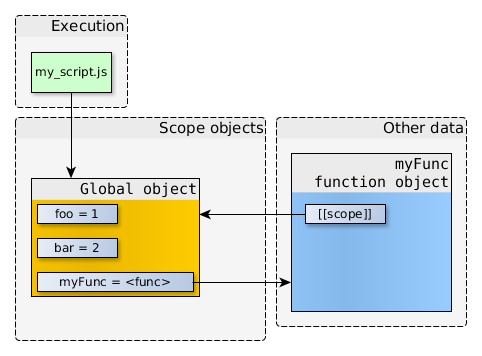
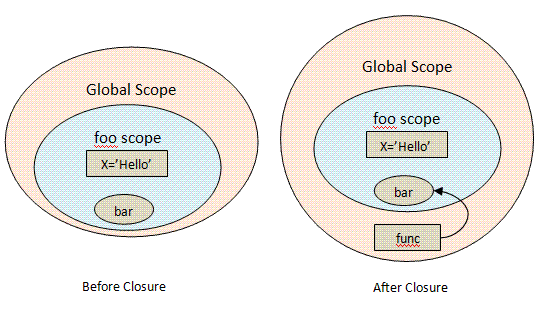
Each function has an internal reference to its lexical environment, which contains:
-
Local variables
-
References to outer scopes
-
Function parameters
When a function is returned or passed around, that environment is preserved.
Closures in Everyday JavaScript
Closures aren’t just theoretical—they appear everywhere in real applications.
1. Closures for Data Encapsulation
Closures allow you to create private variables.
function createCounter() {
  let count = 0;

  return function () {
    count++;
    return count;
  };
}

const counter = createCounter();
console.log(counter()); // 1
console.log(counter()); // 2
Why is this powerful
-
countcannot be accessed directly -
It’s protected from accidental modification
-
This pattern mimics a private state
2. Closures in Event Handlers
Closures are commonly used in UI code.
function setupButton(buttonId) {
  let clickCount = 0;

  document.getElementById(buttonId).addEventListener("click", () => {
    clickCount++;
    console.log(`Clicked ${clickCount} times`);
  });
}
Each button was created with setupButton gets its own preserved state.
3. Closures with setTimeout
A classic closure example:
function delayedGreeting(name) {
  setTimeout(() => {
    console.log(`Hello, ${name}`);
  }, 1000);
}

delayedGreeting("Djamware");
Even though setTimeout runs later, the callback still remembers name.
Common Closure Pitfall: Loops
A well-known issue happens when closures capture loop variables.
Problematic Code
for (var i = 1; i <= 3; i++) {
  setTimeout(() => {
    console.log(i);
  }, 1000);
}
Output:
4
4
4
Why This Happens
-
varis function-scoped -
All closures share the same
i
Fix with let
for (let i = 1; i <= 3; i++) {
  setTimeout(() => {
    console.log(i);
  }, 1000);
}
Output:
1
2
3
Each iteration gets its own block-scoped variable.
Closures vs Global Variables
| Feature | Closures | Global Variables |
|---|---|---|
| Scope | Local & controlled | Global |
| Safety | High | Low |
| Encapsulation | Yes | No |
| Memory | Retained only when needed | Always retained |
Closures help avoid polluting the global scope and make code more maintainable.
Performance and Memory Considerations
Closures retain references to outer variables, which means:
-
Memory is not released until the closure is garbage-collected
-
Overusing closures inside large objects may increase memory usage
Best Practices
-
Avoid unnecessary closures
-
Clean up event listeners
-
Don’t store large objects inside closures unless needed
When Should You Use Closures?
Closures are ideal for:
-
Private variables
-
Factory functions
-
Callbacks and async code
-
State management
-
Functional programming patterns
Avoid closures when:
-
A simple object or class is clearer
-
Long-lived closures retain large memory references
Closures vs Classes
Closures and classes can solve similar problems.
// Closure-based
function createUser(name) {
  return {
    getName: () => name
  };
}
// Class-based
class User {
  constructor(name) {
    this.name = name;
  }

  getName() {
    return this.name;
  }
}
Key Difference
-
Closures provide true privacy
-
Classes offer structure and familiarity
Choose based on clarity and use case.
Conclusion
JavaScript closures are a core concept that unlocks:
-
Powerful abstraction
-
Safer state management
-
Cleaner and more expressive code
Once you understand closures, many advanced JavaScript patterns—like hooks, middleware, and functional utilities—become much easier to grasp.
Mastering closures means mastering JavaScript itself.
You can find the full source code on our GitHub.
We know that building beautifully designed Mobile and Web Apps from scratch can be frustrating and very time-consuming. Check Envato unlimited downloads and save development and design time.
That's just the basics. If you need more deep learning about JavaScript, you can take the following cheap course:
- The Complete JavaScript Course 2025: From Zero to Expert!
- The Complete Full-Stack Web Development Bootcamp
- JavaScript - The Complete Guide 2025 (Beginner + Advanced)
- JavaScript Basics for Beginners
- The Complete JavaScript Course | Zero to Hero in 2025
- JavaScript Pro: Mastering Advanced Concepts and Techniques
- The Modern Javascript Bootcamp Course
- JavaScript: Understanding the Weird Parts
- JavaScript Essentials for Beginners: Learn Modern JS
- JavaScript Algorithms and Data Structures Masterclass
Thanks!