As modern applications grow, so does the complexity of managing multiple services, shared libraries, and deployment pipelines. Microservices, shared UI components, and internal packages can quickly turn into a maintenance nightmare when they live in separate repositories.
This is where monorepo architecture shines.
A monorepo (monolithic repository) is a single repository that contains multiple applications and libraries—versioned, tested, and built together. When done right, it improves code sharing, enforces consistency, and dramatically simplifies refactoring.
In this tutorial, we’ll build a scalable backend monorepo using NestJS inside an Nx Workspace, combining clean architecture with enterprise-grade tooling.
Why NestJS + Nx?
This combo is becoming a default choice for serious backend teams—and for good reason:
NestJS strengths
-
Opinionated, modular architecture
-
Built-in dependency injection
-
First-class support for REST, GraphQL, WebSockets, and microservices
-
TypeScript-first, production-ready
Nx strengths
-
True monorepo tooling (not just folder sharing)
-
Smart dependency graph & affected commands
-
Incremental builds and test caching
-
Clear separation between apps and libs
-
Excellent support for large teams and CI/CD
Together, they allow you to:
-
Share DTOs, utilities, and domain logic safely
-
Scale from a single API to multiple microservices
-
Refactor with confidence using dependency boundaries
-
Keep build times fast—even in large repos
What You’ll Build in This Tutorial
By the end of this guide, you will have:
-
An Nx workspace configured for backend development
-
Multiple NestJS applications inside one monorepo
-
Shared libraries for:
-
Common utilities
-
Database logic
-
DTOs and interfaces
-
-
Clear architectural boundaries
-
Best practices for structuring real-world NestJS monorepos
This tutorial is practical, production-focused, and updated for modern Nx and NestJS workflows—perfect for teams moving beyond single-repo setups.
Understanding Monorepo Architecture (Pros, Cons, and Use Cases)

1. What Is a Monorepo?
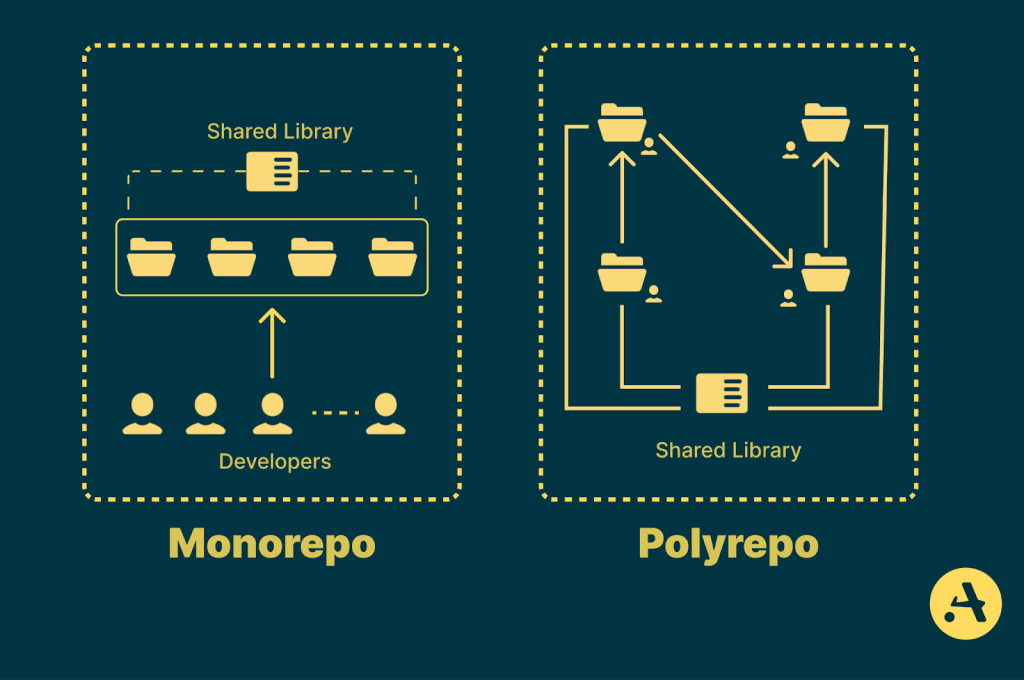
A monorepo (monolithic repository) is a single Git repository that hosts multiple applications and libraries. These projects can be tightly or loosely coupled, but they share the same source control, tooling, and build pipeline.
In a backend monorepo, you’ll often find:
-
Multiple APIs or microservices
-
Shared domain logic and utilities
-
Common infrastructure code (auth, logging, validation)
-
Unified linting, testing, and CI rules
Unlike a monolith, a monorepo does not mean a single deployed application. Each app can still be built, tested, and deployed independently.
2. Monorepo vs Multi-Repo
Before committing to a monorepo, it’s important to understand how it compares to the traditional multi-repo approach.
| Aspect | Monorepo | Multi-Repo |
|---|---|---|
| Code sharing | Easy via internal libraries | Requires packages or duplication |
| Refactoring | Atomic and safe | Risky across repos |
| Dependency management | Centralized | Fragmented |
| CI/CD setup | Unified | Repeated per repo |
| Team onboarding | Faster | Slower |
| Initial complexity | Higher | Lower |
| Repo size | Large | Smaller |
Monorepos trade initial learning curve for long-term productivity—especially as systems grow.
3. Key Advantages of Monorepo Architecture
✅ Easier Code Sharing
Shared DTOs, validation logic, and utilities live in one place. No version mismatch, no publishing private packages just to reuse code.
✅ Atomic Changes
You can update a shared library and all consuming services in a single commit—a huge win for refactoring and bug fixes.
✅ Consistent Tooling
Lint rules, TypeScript config, testing frameworks, and formatting are consistent across the entire backend.
✅ Faster CI with Smart Builds
Tools like Nx analyze the dependency graph and only rebuild or retest what’s affected.
✅ Better Visibility
Nx gives you a visual project graph so you understand how apps and libraries depend on each other—critical for large systems.
4. Common Challenges (and How Nx Helps)
Monorepos aren’t magic. Here are the real challenges—and how modern tooling solves them.
⚠️ Repository Complexity
A poorly structured monorepo can feel overwhelming.
👉 Nx solution:
Clear separation between apps/ and libs/, enforced boundaries, and generators that keep structure consistent.
⚠️ Accidental Tight Coupling
Without rules, apps can import anything from anywhere.
👉 Nx solution:
Dependency constraints and tags that prevent forbidden imports at lint time.
⚠️ Slow Builds
Naively building everything on every change kills productivity.
👉 Nx solution:
Affected commands, computation caching, and incremental builds.
5. When Should You Use a Monorepo?
A monorepo is a great fit if:
-
You have multiple backend services sharing logic
-
You maintain several APIs for one product
-
Your team wants consistent architecture and tooling
-
You expect frequent cross-service refactoring
-
You plan to grow from a single API to microservices
It might not be ideal if:
-
You have very small, unrelated projects
-
Teams are completely independent with different tech stacks
-
You don’t want shared tooling or governance
6. Typical Monorepo Use Cases with NestJS
Using NestJS inside a monorepo is especially effective for:
-
Microservices architectures (REST, GraphQL, or event-driven)
-
API gateways + internal services
-
Shared auth, logging, and validation layers
-
Domain-driven design (DDD) backends
-
SaaS platforms with multiple APIs
NestJS’s modular design maps naturally to Nx libraries, making the monorepo feel intentional—not messy.
Creating an Nx Workspace for NestJS
1. Prerequisites
Before we begin, make sure you have the following installed:
-
Node.js v18 or later
-
npm or pnpm (pnpm is recommended for monorepos)
-
Basic familiarity with TypeScript and NestJS
💡 Nx works best with modern Node versions and a package manager that handles workspaces efficiently.
2. Installing Nx
Nx can be installed globally, but the recommended approach is to use npx, which always runs the latest version.
npx create-nx-workspace@latestYou’ll be prompted with several questions. Use the following answers for this tutorial:
✔ Where would you like to create your workspace? nestjs-monorepo
✔ Which starter do you want to use? NPM Packages
✔ Try the full Nx platform? Yes
Nx will generate a fully configured workspace with a NestJS application ready to run.
3. Exploring the Workspace Structure
After installation, your project structure will look like this:
nestjs-monorepo/
├── .gemini
├── .github
├── .verdaccio
├── .vscode
├── node_modules
├── packages
│   ├── async
│   ├── colors
│   ├── strings
│   ├── utils
│   └── .gitkeep
├── .gitignore
├── .mcp.json
├── .prettierignore
├── .prettierrc
├── AGENTS.md
├── CLAUDE.md
├── error.log
├── eslint.config.mjs
├── nx.json
├── package-lock.json
├── package.json
├── README.md
├── tsconfig.base.json
├── tsconfig.json
└── vitest.workspace.ts
Remove Example Packages.
rm -rf packagesCreate new directories.
mkdir apps
mkdir libs
At this stage:
-
apps/is empty (no applications yet) -
libs/is empty (shared libraries will live here) -
Nx is fully configured and ready
This is intentional and recommended for scalable monorepo setups.
4. Adding NestJS Support to Nx
Since we started with an empty workspace, we now explicitly add NestJS support.
Install the NestJS Nx plugin:
npx nx add @nx/nestThis command:
-
Installs NestJS dependencies
-
Configures Nx generators for NestJS apps and libraries
-
Integrates NestJS into the Nx task system
5. Generating the First NestJS Application
Now, generate a NestJS application called api:
npx nx g @nx/nest:application apps/apiNx will scaffold a production-ready NestJS application inside the monorepo.
Your updated structure:
apps/
└── api/
    ├── src/
    │   ├── app/
    │   ├── main.ts
    │   └── app.module.ts
    ├── project.json
    └── tsconfig.app.json
Each application has its own isolated configuration, build targets, and dependencies.
6. Running the NestJS API
Start the API locally:
npx nx serve apps/apiIf successful, you’ll see:
Nest application successfully startedOpen your browser and visit:
http://localhost:3000/apiYou should see the default NestJS response.
{
  "message": "Hello API"
}
7. Key Nx Commands for Backend Development
You’ll use these commands frequently:
nx serve api        # Run the API locally
nx build api        # Production build
nx test api         # Run tests
nx lint api         # Lint the project
nx graph            # Visualize dependencies
The nx graph command is especially powerful in monorepos—it shows how applications and libraries depend on each other.
8. Why This New Flow Is the Recommended Approach
By starting with an empty workspace and adding NestJS explicitly, we gain:
-
Full control over project structure
-
Cleaner separation between apps and libraries
-
Easier onboarding for additional frameworks
-
Better long-term scalability
This is the modern, enterprise-friendly way to build NestJS monorepos with Nx.
Creating Shared Libraries with Nx (libs/)
1. Why Shared Libraries Matter in a Monorepo
In a real backend system, applications rarely live in isolation. APIs and workers often share:
-
DTOs and interfaces
-
Validation logic
-
Database access layers
-
Authentication and authorization utilities
-
Logging and error handling
Copy-pasting this code between services leads to drift and bugs. Nx libraries solve this by making shared code first-class citizens in the workspace.
With Nx, libraries:
-
Have explicit boundaries
-
Can be tested and linted independently
-
Participate in dependency analysis
-
Are versioned together with apps
2. apps/ vs libs/ (Clear Responsibility Split)
A simple rule that scales well:
| Folder | Responsibility |
|---|---|
apps/ |
Deployable units (API, worker, admin backend) |
libs/ |
Reusable, non-deployable code |
Libraries should never start servers or listen on ports. They exist to support applications.
3. Generating Your First Shared Library
Let’s start with a common and practical example: shared DTOs.
Run:
npx nx g @nx/nest:library libs/shared-dtosNx will create:
libs/
└── shared-dtos/
    ├── src/
    │   └── lib/
    │       └── shared-dtos.module.ts
    ├── project.json
    └── tsconfig.lib.json
This library is:
-
Namespaced
-
Injectable
-
Fully compatible with NestJS DI
4. Creating a Utility Library (Non-Nest)
Not all shared code needs NestJS.
For pure TypeScript utilities (helpers, constants, formatters), use a JS library:
npx nx g @nx/js:library libs/utilsResult:
libs/
└── utils/
    ├── src/
    │   └── index.ts
    ├── project.json
    └── tsconfig.lib.json
This keeps your domain logic clean and framework-agnostic.
5. Using a Library Inside a NestJS Application
Now let’s use shared-dtos inside the api app.
Import it in a module:
import { SharedDtosModule } from '@nestjs-monorepo/shared-dtos';Nx automatically sets up TypeScript path aliases, so you never import via relative paths like ../../../.
This improves:
-
Readability
-
Refactor safety
-
IDE navigation
6. Library Naming Conventions (Best Practices)
As your monorepo grows, naming becomes critical.
Recommended patterns:
-
shared-*→ cross-app utilities -
feature-*→ domain-specific logic -
data-*→ database access -
infra-*→ infrastructure (logging, config, messaging)
Example:
libs/
├── shared-dtos/
├── shared-utils/
├── data-users/
├── feature-auth/
└── infra-logging/
7. Enforcing Dependency Boundaries
One of Nx’s killer features is enforced architecture.
You can prevent:
-
Apps importing other apps
-
Low-level libs importing high-level libs
-
Circular dependencies
This is configured using tags in project.json and enforced via ESLint.
Example concept:
-
type:app -
type:feature -
type:shared
Nx will fail builds if boundaries are violated — before bugs reach production.
8. Visualizing Libraries with Nx Graph
Run:
npx nx graphYou’ll see:
-
Apps
-
Libraries
-
Dependency direction
This is invaluable when your monorepo reaches dozens of projects.
Adding Multiple NestJS Applications (API, Admin, and Worker)
1. Why Multiple Applications in One Monorepo?
In real-world backend systems, a single API is rarely enough. You often need:
-
A public API for clients
-
An admin backend for internal tools
-
A background worker for async jobs (emails, queues, cron tasks)
With a monorepo powered by Nx, all of these can live together while remaining independently deployable.
2. Target Architecture
We’ll create three NestJS applications:
| App | Purpose | Deployment |
|---|---|---|
api |
Public-facing REST/GraphQL API | Web server |
admin |
Internal/admin API | Web server |
worker |
Background jobs & async processing | Long-running process |
All of them will:
-
Share libraries from
libs/ -
Have isolated configs
-
Be built and tested independently
3. Generating the Admin Application
Generate a second NestJS application called admin:
npx nx g @nx/nest:application apps/adminNx adds it under apps/:
apps/
├── api/
└── admin/
    ├── src/
    ├── project.json
    └── tsconfig.app.json
Run it:
npx nx serve adminBy default, it will start on a different port (usually 3001).
4. Generating the Worker Application
Now create a background worker:
npx nx g @nx/nest:application apps/workerResult:
apps/
├── api/
├── admin/
└── worker/
The worker is still a standard NestJS app, but it won’t expose HTTP endpoints.
Instead, it will later handle:
-
Message queues
-
Scheduled jobs
-
Event consumers
-
Email processing
5. Adjusting the Worker for Background Processing
Open apps/worker/src/main.ts and remove the HTTP listener:
async function bootstrap() {
  const app = await NestFactory.create(AppModule);
  await app.init();
}
bootstrap();
Now the worker:
-
Boots NestJS
-
Initializes providers
-
Runs indefinitely without listening on a port
Perfect for queues and cron jobs.
6. Updated Workspace Structure
Your monorepo now looks like this:
apps/
├── api/
├── admin/
└── worker/
libs/
├── shared-dtos/
└── utils/
This structure scales cleanly even with dozens of services.
7. Running Apps Independently
Each application can be run on its own:
npx nx serve api
npx nx serve admin
npx nx serve worker
Nx knows:
-
Which files belong to which app
-
Which libraries does each app depend on
-
What needs rebuilding when something changes
8. Sharing Libraries Across Applications
All apps can safely consume shared libraries:
import { CreateUserDto } from '@nestjs-monorepo/shared-dtos';Key benefits:
-
No duplicated code
-
No version mismatch
-
Atomic refactors across apps
This is where NestJS and Nx complement each other beautifully.
9. Smart Builds with Affected Commands
If you change a file in libs/shared-dtos:
npx nx affected:buildNx will:
-
Rebuild only
api,admin, andworkerif they depend on it -
Skip unrelated projects entirely
This is a massive CI/CD performance win.
Enforcing Module Boundaries with Nx Tags and ESLint
1. Why Module Boundaries Matter
As a monorepo grows, the biggest long-term risk isn’t tooling — it’s uncontrolled dependencies.
Without enforcement, you eventually get:
-
Apps importing other apps
-
Low-level utilities depending on high-level features
-
Circular dependencies
-
“Just this once” shortcuts that become permanent
Nx solves this by making architecture rules enforceable, not just documented.
2. How Nx Enforces Architecture
Nx uses two core concepts:
-
Tags — metadata attached to apps and libraries
-
ESLint rules — to define which tags are allowed to depend on others
When a rule is violated:
-
ESLint fails locally
-
CI fails early
-
Bad architecture never reaches
main
This is one of the strongest features of Nx.
3. Defining Architectural Layers
Let’s define a simple, scalable layering model:
| Layer | Tag | Responsibility |
|---|---|---|
| Applications | type:app |
Deployable NestJS apps |
| Feature libs | type:feature |
Business logic |
| Data libs | type:data |
Database & persistence |
| Shared libs | type:shared |
DTOs, utils, constants |
| Infrastructure | type:infra |
Logging, config, messaging |
This model works well for NestJS + DDD-style backends.
4. Tagging Applications
Open or create apps/api/project.json and add tags:
{
  "name": "api",
  "tags": ["type:app"]
}
Do the same for admin and worker.
5. Tagging Libraries
Now tag your libraries.
Example: libs/shared-dtos/project.json
{
  "name": "shared-dtos",
  "tags": ["type:shared"]
}
Example: libs/utils/project.json
{
  "name": "utils",
  "tags": ["type:shared"]
}
If you later add a feature library:
npx nx g @nx/nest:library feature-authThen tag it:
{
  "name": "feature-auth",
  "tags": ["type:feature"]
}
6. Configuring ESLint Module Boundary Rules
Open eslint.config.mjs (or eslint.config.js) and locate the Nx rule:
import nx from '@nx/eslint-plugin';

export default [
  {
    plugins: { nx },
    rules: {
      'nx/enforce-module-boundaries': [
        'error',
        {
          allow: [],
          depConstraints: [
            {
              sourceTag: 'type:app',
              onlyDependOnLibsWithTags: [
                'type:feature',
                'type:data',
                'type:shared',
                'type:infra'
              ]
            },
            {
              sourceTag: 'type:feature',
              onlyDependOnLibsWithTags: [
                'type:data',
                'type:shared'
              ]
            },
            {
              sourceTag: 'type:data',
              onlyDependOnLibsWithTags: [
                'type:shared'
              ]
            },
            {
              sourceTag: 'type:shared',
              onlyDependOnLibsWithTags: [
                'type:shared'
              ]
            }
          ]
        }
      ]
    }
  }
];
This rule defines your architecture in code.
7. What This Prevents (In Practice)
With these rules in place:
❌ shared-utils importing feature-auth → blocked
❌ feature-auth importing api → blocked
❌ admin importing api → blocked
✅ api importing feature-auth → allowed
✅ feature-auth importing shared-dtos → allowed
You get compile-time architecture validation.
8. Seeing Violations in Action
If someone violates a boundary, ESLint will show:
A project tagged with "type:shared" cannot depend on a project tagged with "type:feature"This happens:
-
In the editor
-
During
npx nx lint -
In CI
No Slack arguments. No code review debates. The rules decide.
9. Visualizing Boundaries with Nx Graph
Run:
npx nx graphNx will show:
-
Apps
-
Libraries
-
Dependency direction
-
Tag-based separation
This is incredibly helpful when onboarding new developers.
10. Why This Matters Long-Term
This setup gives you:
-
Predictable growth
-
Safe refactoring
-
Clear ownership boundaries
-
Fewer production bugs
-
Faster onboarding
Most monorepos fail because architecture lives in people’s heads.
Nx makes it executable.
Configuring Environment Variables per App (API, Admin, Worker)
1. Why Per-App Environment Configuration Matters
In a monorepo with multiple NestJS applications, not all apps share the same configuration.
Typical differences:
-
API and Admin listen on different ports
-
The worker doesn’t expose HTTP at all
-
Each app may use different databases, queues, or API keys
-
Secrets should never leak across app boundaries
Nx runs all apps from the same repo, but configuration must remain isolated.
2. Recommended Strategy (Simple & Scalable)
We’ll use:
-
One
.envfile per application -
NestJS
@nestjs/configfor loading variables -
No global
.envto avoid accidental coupling
Final layout:
apps/
├── api/
│   ├── .env
│   └── src/
├── admin/
│   ├── .env
│   └── src/
└── worker/
    ├── .env
    └── src/
This approach works locally, in CI, and in production.
3. Installing the Config Module
Install the NestJS config package once (workspace-wide):
npm install @nestjs/configNx will make it available to all apps.
4. Configuring Environment Variables in the API App
Step 1: Create apps/api/.env
PORT=3000
DATABASE_URL=postgres://api_user:password@localhost:5432/api_db
JWT_SECRET=api-secret-key
Step 2: Load .env in AppModule
Install @nestjs/config if not exists from the workspace root:
npm install @nestjs/configOpen apps/api/src/app/app.module.ts:
import { Module } from '@nestjs/common';
import { ConfigModule } from '@nestjs/config';

@Module({
  imports: [
    ConfigModule.forRoot({
      envFilePath: 'apps/api/.env',
      isGlobal: true,
    }),
  ],
})
export class AppModule {}
Now environment variables are injectable anywhere in the API app.
5. Using Config Values in Code
Example service:
import { Injectable } from '@nestjs/common';
import { ConfigService } from '@nestjs/config';

@Injectable()
export class AuthService {
  constructor(private config: ConfigService) {}

  getJwtSecret() {
    return this.config.get<string>('JWT_SECRET');
  }
}
This keeps secrets:
-
Out of source code
-
Scoped to the correct app
-
Easy to override per environment
6. Configuring the Admin App Separately
Create apps/admin/.env:
PORT=3001
DATABASE_URL=postgres://admin_user:password@localhost:5432/admin_db
ADMIN_API_KEY=admin-secret
Then update apps/admin/src/app/app.module.ts:
ConfigModule.forRoot({
  envFilePath: 'apps/admin/.env',
  isGlobal: true,
});
Even though both apps run in the same repo:
-
They load different configs
-
They stay completely isolated
7. Configuring the Worker App
Workers usually need no HTTP port, but do need infrastructure config.
Create apps/worker/.env:
QUEUE_URL=redis://localhost:6379
[email protected]
Load it in apps/worker/src/app/app.module.ts:
ConfigModule.forRoot({
  envFilePath: 'apps/worker/.env',
  isGlobal: true,
});
The worker can now:
-
Consume queues
-
Send emails
-
Run cron jobs
without exposing any server.
8. Avoiding Common Mistakes
❌ One global .env at repo root
→ Leads to accidental cross-app dependencies
❌ Hardcoded values in shared libraries
→ Libraries should receive config via DI, never read env directly
❌ Sharing secrets between apps
→ Each app should have the minimum access it needs
9. Environment Variables in Production
In production:
-
.envfiles are optional -
CI/CD systems inject environment variables
-
ConfigModulereads fromprocess.envautomatically
You can safely use the same code for:
-
Local development
-
Docker
-
Kubernetes
-
Cloud platforms
10. Optional: Centralizing Config Logic (Advanced)
As your system grows, you can:
-
Create a
shared-configlibrary -
Export typed config factories
-
Validate env variables with schemas (e.g. Zod or Joi)
But keep the values app-specific.
Preparing the Monorepo for CI/CD with Nx Affected Commands
1. Why CI/CD Is Hard in Monorepos (Without Nx)
In a traditional monorepo, CI often looks like this:
-
Every commit triggers:
-
Build all apps
-
Test all libs
-
Lint everything
-
-
Pipelines are slow
-
Developers stop trusting CI
Nx changes the game by understanding project dependencies.
2. What “Affected” Means in Nx
Nx builds a dependency graph of:
-
Applications
-
Libraries
-
Their relationships
When you run an affected command, Nx answers:
“Which projects are impacted by this change?”
Only those projects run.
This is the killer feature of Nx.
3. How Nx Determines Affected Projects
Nx compares:
-
Your current branch
-
Against a base branch (usually
main)
It analyzes:
-
Changed files
-
Project boundaries
-
Dependency chains
Example:
-
Change
libs/shared-dtos -
Nx rebuilds:
-
api -
admin -
worker
-
-
Unrelated apps are skipped
4. Core Affected Commands
These are the commands you’ll use in CI:
npx nx affected:lint
npx nx affected:test
npx nx affected:build
Each command:
-
Runs only on affected projects
-
Uses caching automatically
-
Dramatically reduces CI time
5. Local Testing with Affected
You don’t need CI to benefit from this.
Run locally:
npx nx affected:test --base=mainThis gives you CI-like confidence before pushing.
6. Example CI Pipeline (GitHub Actions)
Here’s a minimal but production-ready workflow:
name: CI

on:
  pull_request:
  push:
    branches: [main]

jobs:
  nx-ci:
    runs-on: ubuntu-latest
    steps:
      - uses: actions/checkout@v4
        with:
          fetch-depth: 0

      - uses: actions/setup-node@v4
        with:
          node-version: 20

      - run: npm ci

      - run: npx nx affected:lint --base=origin/main
      - run: npx nx affected:test --base=origin/main
      - run: npx nx affected:build --base=origin/main
⚠️ Important: fetch-depth: 0 is required so Nx can compare branches.
7. Caching: Free Speed Boost
Nx caches:
-
Builds
-
Tests
-
Lint results
If nothing relevant changed:
-
Tasks are skipped
-
Results are reused
You get faster CI without changing a single line of code.
(Optional) Later, you can add Nx Cloud for distributed caching.
8. Per-App Deployment Pipelines
Because apps are independent, you can:
-
Build only
apiwhen API code changes -
Deploy
workerseparately -
Skip admin deploys entirely if untouched
Example:
npx nx affected --target=build --projects=apiThis enables:
-
Microservice-style deployments
-
Monorepo simplicity
9. Common CI Mistakes to Avoid
❌ Running nx build (builds everything)
❌ Shallow Git clones
❌ Ignoring dependency boundaries
❌ One giant deploy step
Nx gives you the tools — use them properly.
10. What You Have Now
At this point, your setup includes:
-
Multiple NestJS apps
-
Shared libraries
-
Enforced architecture
-
Isolated configuration
-
Fast, scalable CI/CD
This is enterprise-grade backend engineering.
Dockerizing Nx + NestJS Applications
1. Docker Strategy for Nx Monorepos
Key principles for Docker + Nx:
-
One Docker image per app
-
Build with Nx, run with Node
-
Never copy the whole repo unnecessarily
-
Use multi-stage builds
-
Reuse the same pattern for API, Admin, Worker
Each NestJS app:
-
Builds independently
-
Ships independently
-
Deploys independently
This fits perfectly with Nx and NestJS.
2. Production Build with Nx
Before Docker, confirm the app builds correctly:
npx nx build apiNx outputs to:
dist/apps/apiThis is what we’ll run inside Docker — not the source code.
3. Dockerfile for a NestJS App (API)
Create this file:
apps/api/Dockerfile✅ Multi-Stage Dockerfile (Recommended)
# ---------- Build stage ----------
FROM node:20-alpine AS builder

WORKDIR /app

# Copy root configs
COPY package*.json nx.json tsconfig.base.json ./
COPY node_modules ./node_modules

# Copy source
COPY apps/api apps/api
COPY libs libs

# Build only the API app
RUN npx nx build api

# ---------- Runtime stage ----------
FROM node:20-alpine

WORKDIR /app

ENV NODE_ENV=production

# Copy built output
COPY --from=builder /app/dist/apps/api ./

EXPOSE 3000

CMD ["node", "main.js"]
✔ Small
✔ Fast
✔ Reproducible
✔ App-specific
4. .dockerignore (Important)
At repo root:
node_modules
dist
.git
.gitignore
.env
apps/*/.env
This keeps images lean and secure.
5. Building and Running the API Container
From the repo root:
docker build -t nestjs-api -f apps/api/Dockerfile .Run it:
docker run -p 3000:3000 --env-file apps/api/.env nestjs-apiVisit:
http://localhost:3000🎉 Your Nx-built NestJS API is now running in Docker.
6. Dockerizing the Admin App
Repeat the same pattern:
apps/admin/DockerfileOnly change the app name and port:
RUN npx nx build admin
EXPOSE 3001
Build:
docker build -t nestjs-admin -f apps/admin/Dockerfile .7. Dockerizing the Worker App
Workers don’t expose ports.
apps/worker/DockerfileFROM node:20-alpine AS builder
WORKDIR /app
COPY package*.json nx.json tsconfig.base.json ./
COPY node_modules ./node_modules
COPY apps/worker apps/worker
COPY libs libs
RUN npx nx build worker
FROM node:20-alpine
WORKDIR /app
ENV NODE_ENV=production
COPY --from=builder /app/dist/apps/worker ./
CMD ["node", "main.js"]Run:
docker run --env-file apps/worker/.env nestjs-workerPerfect for:
-
Queues
-
Cron jobs
-
Background tasks
8. Docker Compose (Local Dev Example)
version: '3.9'

services:
  api:
    build:
      context: .
      dockerfile: apps/api/Dockerfile
    ports:
      - "3000:3000"
    env_file:
      - apps/api/.env

  admin:
    build:
      context: .
      dockerfile: apps/admin/Dockerfile
    ports:
      - "3001:3001"
    env_file:
      - apps/admin/.env

  worker:
    build:
      context: .
      dockerfile: apps/worker/Dockerfile
    env_file:
      - apps/worker/.env
Now your entire monorepo runs with:
docker compose up --build9. CI/CD + Docker + Nx (Best Practice)
In CI:
-
Run
nx affected:build -
Build Docker images only for affected apps
-
Push only what changed
Example logic:
npx nx affected --target=build
npx nx affected --target=container
This gives you:
-
Faster pipelines
-
Smaller registries
-
Safer deploys
10. Common Docker Mistakes in Nx Monorepos
❌ One giant Dockerfile for all apps
❌ Copying the entire repo blindly
❌ Running nx serve in production
❌ Baking secrets into images
✔ Always build → copy dist → run Node
Kubernetes Deployment per App (API, Admin, Worker)
1. Why Per-App Kubernetes Deployments Matter
Even though all apps live in one Nx monorepo, they should never be deployed together.
Each app must have:
-
Its own container image
-
Its own Deployment
-
Its own scaling rules
-
Its own environment configuration
This aligns perfectly with:
-
Nx (independent builds)
-
NestJS (modular apps)
-
Kubernetes (isolated workloads)
2. High-Level Architecture
Nx Monorepo
 ├── API Docker Image  ──► Kubernetes Deployment (api)
 ├── Admin Docker Image ─► Kubernetes Deployment (admin)
 └── Worker Docker Image ─► Kubernetes Deployment (worker)
Each app:
-
Deploys independently
-
Scales independently
-
Fails independently (and safely)
3. Kubernetes Folder Structure (Recommended)
Keep Kubernetes manifests inside the repo, but outside app code:
k8s/
├── api/
│   ├── deployment.yaml
│   ├── service.yaml
│   └── configmap.yaml
├── admin/
│   ├── deployment.yaml
│   ├── service.yaml
│   └── configmap.yaml
└── worker/
    ├── deployment.yaml
    └── configmap.yaml
This keeps:
-
Infrastructure visible
-
Ownership clear
-
GitOps workflows simple
4. API Deployment (HTTP Service)
k8s/api/deployment.yaml
apiVersion: apps/v1
kind: Deployment
metadata:
  name: api
spec:
  replicas: 2
  selector:
    matchLabels:
      app: api
  template:
    metadata:
      labels:
        app: api
    spec:
      containers:
        - name: api
          image: your-registry/nestjs-api:latest
          ports:
            - containerPort: 3000
          envFrom:
            - configMapRef:
                name: api-config
k8s/api/service.yaml
apiVersion: v1
kind: Service
metadata:
  name: api
spec:
  selector:
    app: api
  ports:
    - port: 80
      targetPort: 3000
  type: ClusterIP
k8s/api/configmap.yaml
apiVersion: v1
kind: ConfigMap
metadata:
  name: api-config
data:
  PORT: "3000"
  DATABASE_URL: "postgres://api_user@db/api"
5. Admin Deployment (Internal API)
Admin is usually internal-only.
replicas: 1Service type stays ClusterIP, and access is typically via:
-
VPN
-
Internal ingress
-
Port-forwarding
This reduces the attack surface.
6. Worker Deployment (No Service Required)
Workers don’t expose HTTP endpoints.
k8s/worker/deployment.yaml
apiVersion: apps/v1
kind: Deployment
metadata:
  name: worker
spec:
  replicas: 1
  selector:
    matchLabels:
      app: worker
  template:
    metadata:
      labels:
        app: worker
    spec:
      containers:
        - name: worker
          image: your-registry/nestjs-worker:latest
          envFrom:
            - configMapRef:
                name: worker-config
No Service needed ✅
7. Scaling Strategies per App
| App | Scaling Strategy |
|---|---|
| API | HorizontalPodAutoscaler (CPU / RPS) |
| Admin | Fixed replicas (usually 1) |
| Worker | Scale by queue depth |
Example (API autoscaling):
apiVersion: autoscaling/v2
kind: HorizontalPodAutoscaler
metadata:
  name: api-hpa
spec:
  scaleTargetRef:
    apiVersion: apps/v1
    kind: Deployment
    name: api
  minReplicas: 2
  maxReplicas: 10
  metrics:
    - type: Resource
      resource:
        name: cpu
        target:
          type: Utilization
          averageUtilization: 70
8. Secrets Management (Important)
❌ Never store secrets in Git
❌ Never bake secrets into Docker images
Use:
-
Secretresources -
External secret managers (AWS, GCP, Vault)
Example:
kubectl create secret generic api-secrets \
  --from-literal=JWT_SECRET=super-secret
Then reference it:
envFrom:
  - secretRef:
      name: api-secrets
9. CI/CD Flow (Nx + Docker + Kubernetes)
A clean pipeline looks like this:
-
nx affected:build -
Build Docker images only for affected apps
-
Push images
-
Apply Kubernetes manifests per app
This keeps:
-
Deployments fast
-
Rollbacks safe
-
Changes isolated
10. Common Kubernetes Mistakes in Monorepos
❌ One Deployment for all apps
❌ One Docker image for everything
❌ Shared ConfigMaps across apps
❌ Scaling workers like HTTP servers
✔ Treat each app as its own product
11. Final Architecture Recap
You now have:
-
Nx monorepo
-
Multiple NestJS apps
-
Shared libraries
-
Enforced boundaries
-
Per-app config
-
CI/CD with affected builds
-
Dockerized services
-
Kubernetes deployments per app
This is real-world, production-grade backend architecture — exactly what modern teams expect.
Ingress & API Gateway Setup for Nx + NestJS on Kubernetes
1. Ingress vs API Gateway (Quick Clarification)
These two are often confused, but they solve different layers of the problem.
| Component | Responsibility |
|---|---|
| Ingress | External HTTP entry point into the cluster |
| API Gateway | Request routing, auth, rate limiting, aggregation |
In Kubernetes:
-
Ingress handles network-level routing
-
API Gateway handles application-level logic
They work best together, not as replacements.
2. Recommended Setup for This Architecture
For Nx + NestJS, a clean and proven stack is:
-
NGINX Ingress Controller
-
NestJS API Gateway (separate app or part of
api) -
Kubernetes Services per app
Flow:
Client
  ↓
Ingress (nginx)
  ↓
API Gateway (NestJS)
  ↓
Internal Services (admin, worker, others)
3. Installing NGINX Ingress Controller
Using Helm (recommended):
helm repo add ingress-nginx https://kubernetes.github.io/ingress-nginx
helm repo update

helm install ingress-nginx ingress-nginx/ingress-nginx \
  --namespace ingress-nginx \
  --create-namespace
Verify:
kubectl get pods -n ingress-nginx4. Basic Ingress for the API
Create:
k8s/ingress/api-ingress.yamlapiVersion: networking.k8s.io/v1
kind: Ingress
metadata:
name: api-ingress
annotations:
nginx.ingress.kubernetes.io/rewrite-target: /
spec:
ingressClassName: nginx
rules:
- host: api.example.com
http:
paths:
- path: /
pathType: Prefix
backend:
service:
name: api
port:
number: 80This exposes:
https://api.example.com5. Exposing Admin Separately (Internal Access)
Admin APIs should not be public.
Options:
-
Separate hostname
-
IP allowlist
-
VPN-only access
Example:
- host: admin.internal.example.comOr protect via annotations:
nginx.ingress.kubernetes.io/whitelist-source-range: "10.0.0.0/8"6. NestJS as an API Gateway
Instead of routing clients directly to multiple services, the API app can act as a gateway.
Responsibilities:
-
Authentication & authorization
-
Request validation
-
Rate limiting
-
Aggregation
-
Versioning
This fits naturally with NestJS.
7. Example: Gateway Routing Inside NestJS
@Controller('users')
export class UsersGatewayController {
  constructor(private readonly http: HttpService) {}

  @Get()
  async getUsers() {
    return this.http.get('http://users-service/users').toPromise();
  }
}
Clients only talk to:
api.example.comInternal services remain private.
8. Rate Limiting at the Edge
Ingress-level (cheap & fast):
nginx.ingress.kubernetes.io/limit-rps: "10"App-level (flexible):
npm install @nestjs/throttlerThrottlerModule.forRoot({
ttl: 60,
limit: 100,
});Best practice:
-
Basic protection at ingress
-
Fine-grained rules in NestJS
9. TLS / HTTPS Setup
Ingress handles TLS:
tls:
  - hosts:
      - api.example.com
    secretName: api-tls
Use:
-
cert-manager
-
Let’s Encrypt
-
Cloud provider TLS
Your apps remain HTTP-only internally.
10. When to Add a Dedicated API Gateway Tool
NestJS works great initially, but at scale consider:
-
Kong
-
Traefik
-
Istio
Nx monorepos make this migration easy — your services stay untouched.
11. Final Traffic Flow (End-to-End)
Internet
  ↓
Ingress (TLS, routing, limits)
  ↓
API Gateway (NestJS)
  ↓
Internal Services (admin, workers, others)
Clean. Secure. Scalable.
12.Tutorial Wrap-Up (You Built This)
You’ve now covered:
-
Nx monorepo architecture
-
Multiple NestJS apps
-
Shared libraries & boundaries
-
Per-app config
-
CI/CD optimization
-
Docker
-
Kubernetes
-
Ingress & API Gateway
This is senior-level backend architecture — exactly the kind of tutorial that stands out on Djamware.
Final Conclusion & Key Takeaways
You’ve just walked through a complete, production-grade backend architecture—from repository structure all the way to Kubernetes ingress. This isn’t a toy setup or a proof of concept; it’s the same pattern used by real teams running real systems at scale.
By combining Nx with NestJS, you get the best of both worlds: developer productivity and operational discipline.
What You’ve Built
Over the course of this tutorial, you implemented:
-
A clean Nx monorepo with clear ownership boundaries
-
Multiple NestJS applications (API, Admin, Worker)
-
Shared libraries with enforced architectural rules
-
Per-app configuration without leaking secrets
-
Smart CI/CD pipelines using Nx affected commands
-
Dockerized applications with small, predictable images
-
Independent Kubernetes deployments per app
-
A secure Ingress + API Gateway setup
-
Clear architecture diagrams that explain the system end to end
Each app can now:
-
Be developed independently
-
Be tested independently
-
Be deployed independently
-
Be scaled independently
All while living in one repository.
Why This Architecture Works Long-Term
This setup succeeds because it turns best practices into defaults:
-
Architecture is enforced by tooling, not tribal knowledge
-
Refactoring is safe, not scary
-
CI is fast, not something developers avoid
-
Deployments are boring (the highest compliment in ops)
-
Growth doesn’t require rewrites—just more apps and libraries
Most importantly, it avoids the two common traps:
-
❌ One giant repo with no rules
-
❌ Dozens of repos with duplicated logic
Nx lets you sit comfortably in the middle.
When to Use This Approach
This architecture is a great fit if you are:
-
Building a SaaS platform
-
Migrating from a monolith to microservices
-
Managing multiple APIs for one product
-
Working with a growing engineering team
-
Planning for Kubernetes or cloud-native deployments
If you start small, this setup won’t slow you down.
If you grow big, it won’t collapse under its own weight.
Final Takeaway
A monorepo is not about putting everything in one place.
It’s about managing complexity deliberately.
Nx gives you the structure.
NestJS gives you the foundation.
The rest is just good engineering decisions—ones you now know how to make.
If you build your next backend this way, you’re not just following trends—you’re setting yourself up for years of sustainable development.
🚀 Well done. This is senior-level backend architecture, end to end.
You can find the full source code on our GitHub.
=======We know that building beautifully designed Mobile and Web Apps from scratch can be frustrating and very time-consuming. Check Envato unlimited downloads and save development and design time.
That's just the basics. If you need more deep learning about Nest.js, you can take the following cheap course:
- NestJS: The Complete Developer's Guide
- NestJS Masterclass - NodeJS Framework Backend Development
- NestJS Mastery: Build & Deploy a Production-Ready API
- NestJS Zero to Hero - Modern TypeScript Back-end Development
- NestJS Microservices: Build & Deploy a Scaleable Backend
- NestJS: Build a Real-Time Social Media API (/w WebSockets)
- NestJS Unleashed: Develop Robust and Maintainable Backends
- The Nest JS Bootcamp - Complete Developer Guide
Thanks!