
Capacitor plugins are what transform Ionic apps from simple web views into real, native mobile experiences. Camera access, geolocation, file storage, biometric auth — all of it flows through Capacitor’s plugin system. And when plugins are used correctly, Ionic apps can feel indistinguishable from fully native ones.
But this is also where many Ionic projects start to crack. Mismanaged permissions, unnecessary native calls, mixing Cordova plugins, or treating Capacitor like a black box often lead to performance issues and platform-specific bugs that only appear late in development.
This guide takes a practical, production-first approach to Capacitor plugins. Instead of just showing how to call native APIs, we’ll focus on how they actually work, when to rely on official plugins, when custom plugins make sense, and how to integrate native features safely across Web, Android, and iOS.
Whether you’re building your first Ionic app or maintaining a production codebase, this tutorial will help you use Capacitor plugins with confidence — and avoid the common mistakes that quietly hurt app quality.
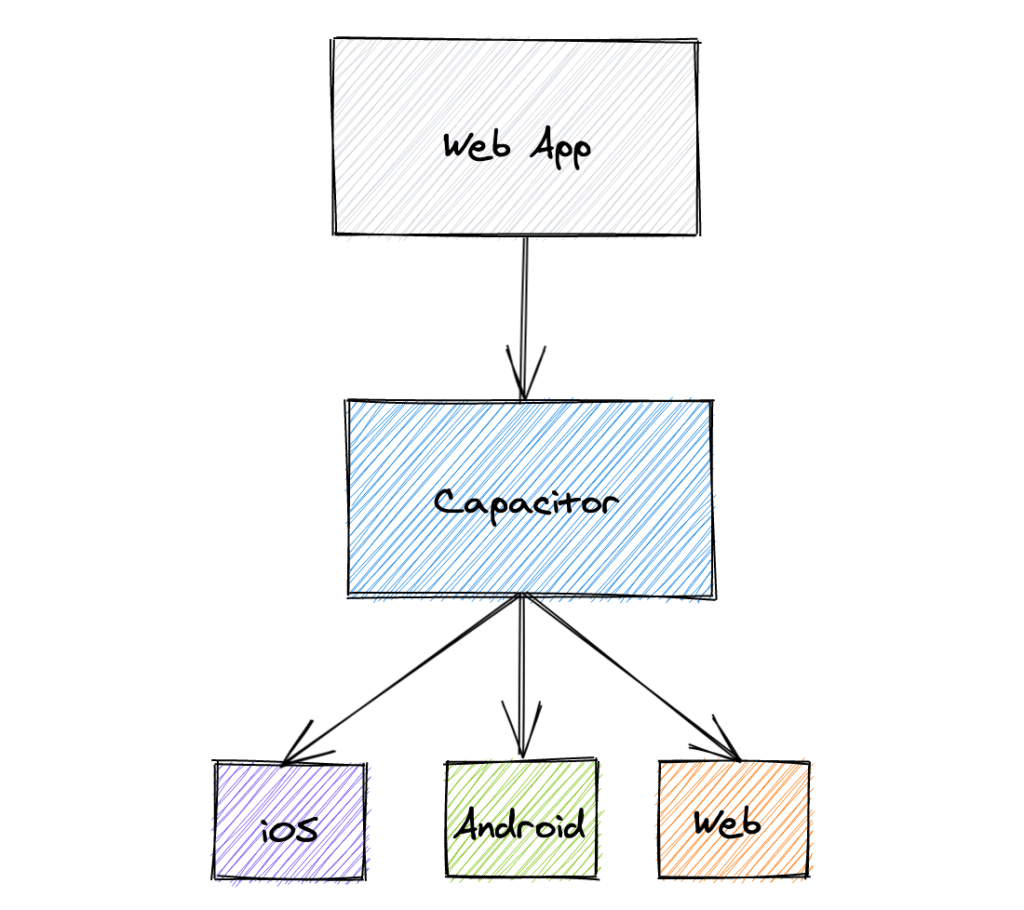

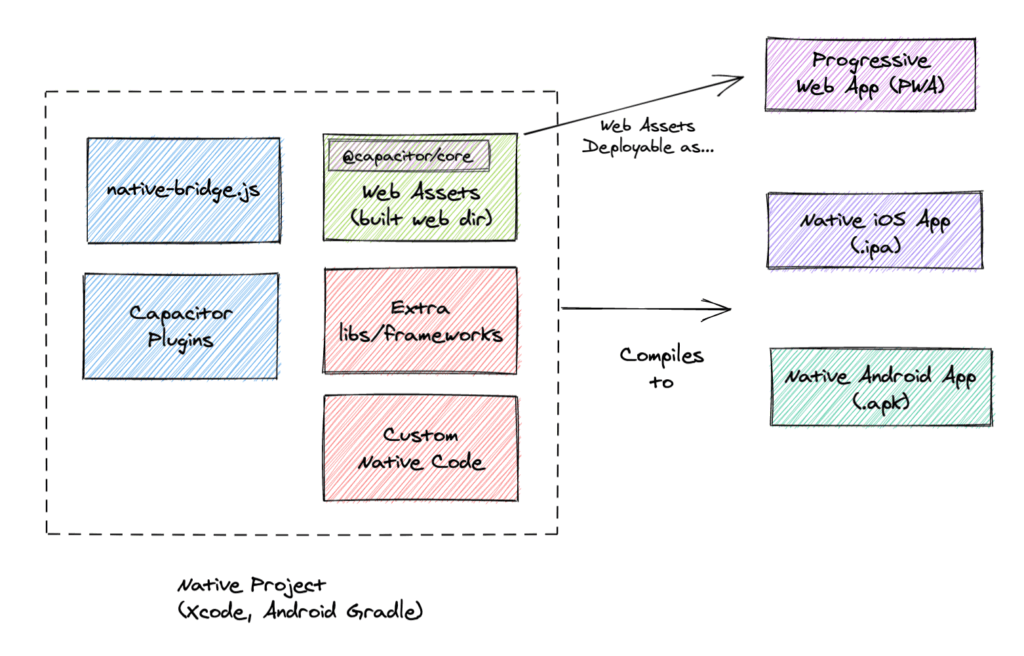
Capacitor plugins are what turn Ionic apps from “just web apps” into truly native experiences. But misuse them, and you’ll hit performance issues, permission bugs, and platform inconsistencies fast.
1. What Is a Capacitor Plugin?
A Capacitor plugin is a bridge between your Ionic web app and native platform APIs.
Key concepts:
-
Web layer (TypeScript)
-
Native implementation (Android / iOS)
-
Capacitor bridge (JSON-based messaging)
Why Capacitor over Cordova?
-
Modern API design
-
First-class TypeScript support
-
Direct access to native SDKs
-
No magic global objects
2. Capacitor Plugin Types
2.1 Official Plugins
Maintained by the Ionic team:
-
@capacitor/camera -
@capacitor/geolocation -
@capacitor/filesystem -
@capacitor/device -
@capacitor/network
✅ Recommended for most use cases
2.2 Community Plugins
Published by the ecosystem:
-
Bluetooth
-
Biometrics
-
Background tasks
-
Advanced sensors
⚠️ Check maintenance status before using
2.3 Custom Plugins
Used when:
-
No existing plugin fits your needs
-
You need proprietary SDK access
-
Performance-critical native logic is required
3. Installing and Syncing Capacitor Plugins
npm install @capacitor/camera
npx cap sync
Common mistakes to avoid:
-
Forgetting
cap sync -
Editing native files before syncing
-
Installing Cordova plugins unnecessarily
4. Using a Capacitor Plugin (Camera Example)
import { Camera, CameraResultType } from '@capacitor/camera';

const photo = await Camera.getPhoto({
  quality: 80,
  resultType: CameraResultType.Uri
});
Platform Notes
-
Web: Uses browser APIs
-
Android: Native camera intent
-
iOS:
AVFoundation
5. Handling Permissions Correctly
Capacitor does not auto-grant permissions.
Best practices:
-
Request permissions only when needed
-
Explain why permissions are required
-
Handle denial gracefully
const permission = await Camera.requestPermissions();
6. Platform Detection & Conditional Logic
import { Capacitor } from '@capacitor/core';

if (Capacitor.getPlatform() === 'web') {
  // Web fallback
}
✅ Avoid platform-specific hacks unless necessary.
7. Creating a Custom Capacitor Plugin
npx @capacitor/cli plugin:generateGenerated structure:
-
src/→ TypeScript API -
android/→ Java/Kotlin -
ios/→ Swift -
example/→ Demo app
When to go custom
-
Native SDK integration
-
Hardware-level access
-
Offline or background tasks
8. Error Handling & Defensive Coding
Always wrap plugin calls:
try {
  await Geolocation.getCurrentPosition();
} catch (err) {
  console.error('Location error', err);
}
Common failure cases:
-
Permissions denied
-
Feature unavailable
-
Platform mismatch
9. Performance & Security Best Practices
Performance
-
Avoid excessive plugin calls
-
Batch native operations
-
Cache results when possible
Security
-
Never expose secrets in plugin code
-
Validate input on the native side
-
Avoid reflection-based plugins
10. Testing Capacitor Plugins
-
Web: Browser DevTools
-
Android: Android Studio Emulator
-
iOS: Xcode Simulator
💡 Tip: Always test real devices for camera, sensors, and biometrics.
11. Common Pitfalls (and How to Avoid Them)
❌ Mixing Cordova and Capacitor plugins
❌ Skipping permission checks
❌ Not handling web fallbacks
❌ Forgetting native rebuilds after plugin changes
Conclusion
Capacitor plugins are the backbone of real-world Ionic applications. By using official plugins where possible, understanding the native bridge, and following best practices, you can build fast, secure, and maintainable hybrid apps that feel truly native.
We know that building beautifully designed Mobile and Web Apps from scratch can be frustrating and very time-consuming. Check Envato unlimited downloads and save development and design time.
That's just the basics. If you need more deep learning about Ionic, Angular, and TypeScript, you can take the following cheap course:
- Ionic - Build iOS, Android & Web Apps with Ionic & Angular
- Master Ionic 8+: Beginner to Expert Food Delivery App Course
- Ionic 8+ Masterclass:Build Real-Time Chat Apps with Firebase
- Ionic 8+ & Supabase Full-Stack Mastery: Build Real-Time Apps
- Learn Ionic React By Building a WhatsApp Clone
- Progressive Web Apps (PWA) - The Complete Guide
- IONIC - Build Android & Web Apps with Ionic
- Ionic Framework with VueJS: Build a CRUD App Using SQLite
- Angular, Ionic & Node: Build A Real Web & Mobile Chat App
- Ionic Apps with Firebase
Happy codings!